
How to Use the Chibi Art Text-to-Image Generator
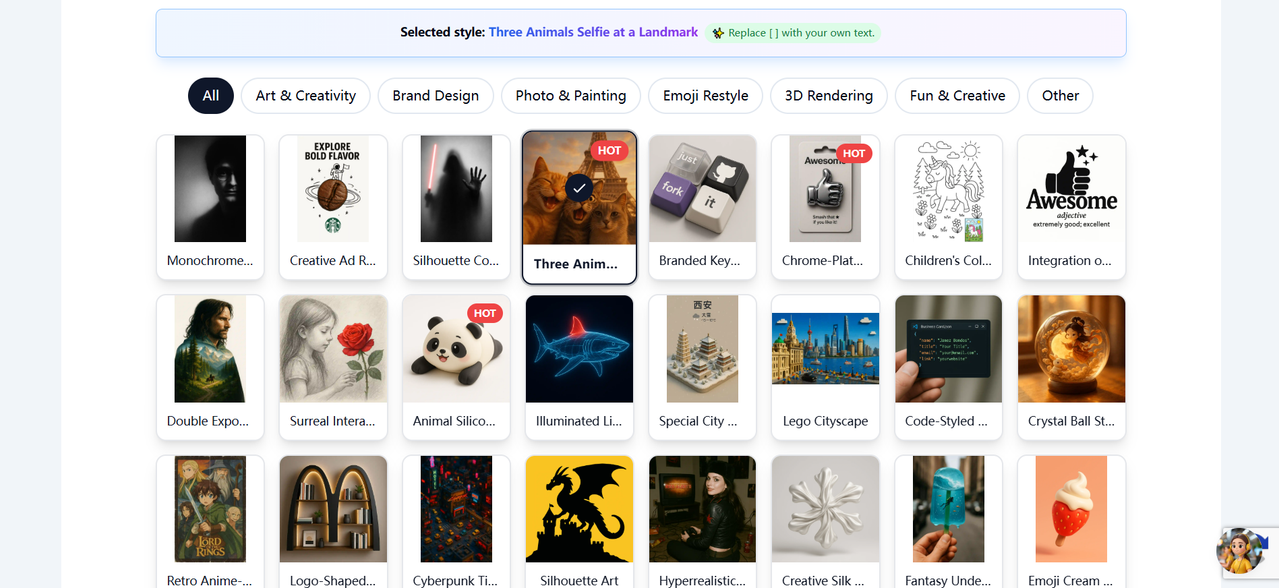
The Chibi Art Text-to-Image Generator at Chibi.pics is a specialized AI chibi generator that combines an intelligent template system with traditional text-to-image technology. Unlike conventional tools, it offers a curated library of professionally designed style templates across categories including Art & Creativity, Photo & Painting, and Fun & Creative. When users select a template—such as "Three Animals Selfie at a Landmark"—the system auto-populates the input field with optimized preset prompts. Users can generate images immediately using these templates or customize the bracketed placeholders to create personalized chibi art. The tool supports three aspect ratios (1:1, 2:3, and 3:2) and operates on a credit-based system (1 credit per generation). This hybrid approach makes professional chibi maker capabilities accessible to AI beginners while offering flexibility for experienced users. The generator is ideal for creating social media avatars, e-commerce product visuals, custom stickers, and personal creative projects.
Looking for a powerful yet user-friendly AI chibi generator that transforms your ideas into adorable characters without requiring artistic skills? The Chibi Art Text-to-Image feature at Chibi.pics offers an innovative approach to creating kawaii-style artwork. Unlike standard chibi maker tools that leave you staring at a blank prompt box, this platform combines intuitive AI technology with a curated library of style templates, making professional chibi art creation accessible to everyone—from complete beginners to seasoned content creators.
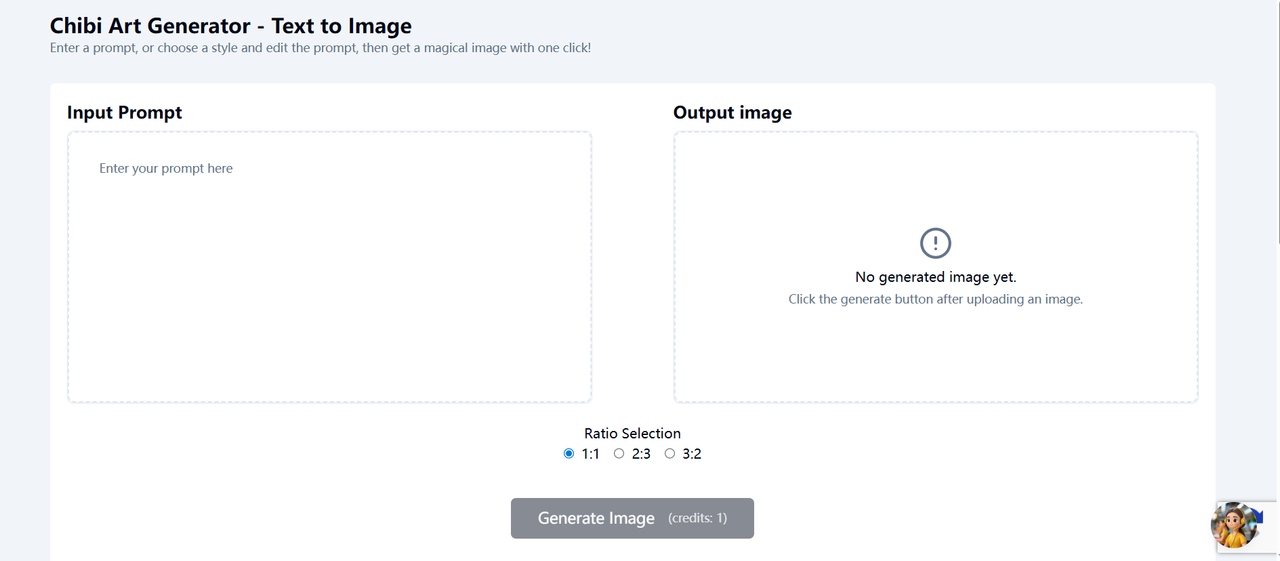
What Makes This Chibi Generator Unique?
While most chibi AI tools require users to craft complex prompts from scratch, Chibi.pics revolutionizes the workflow with its intelligent template system. This feature functions as a chibi clipart prompt generator, eliminating the guesswork from AI image creation.
The Template Advantage
The platform offers an extensive collection of professionally designed style templates across categories like:
- Art & Creativity (Monochrome portraits, Surreal interactions)
- Photo & Painting (Double exposure, Special cityscapes)
- Fun & Creative (Emoji restyles, Lego cityscapes)
- 3D Rendering (Animal silicone toys, Chrome-plated designs)
When you select a template—for example, the "Three Animals Selfie at a Landmark" style—the system automatically populates the input field with optimized preset prompts. These templates serve as chibi prompt generators, providing professionally structured descriptions that you can use instantly or customize to your needs.
Step-by-Step: Creating Chibi Art from Text
Step 1: Select Your Style Template
Navigate to the template gallery and browse through the diverse collection. Each template thumbnail provides a visual preview of the style. Click on your preferred design—this action loads the preset chibi art prompt into the input field.
As shown in your workflow screenshots, this transforms the blank canvas into a detailed starting point.
Step 2: Customize Your Prompt
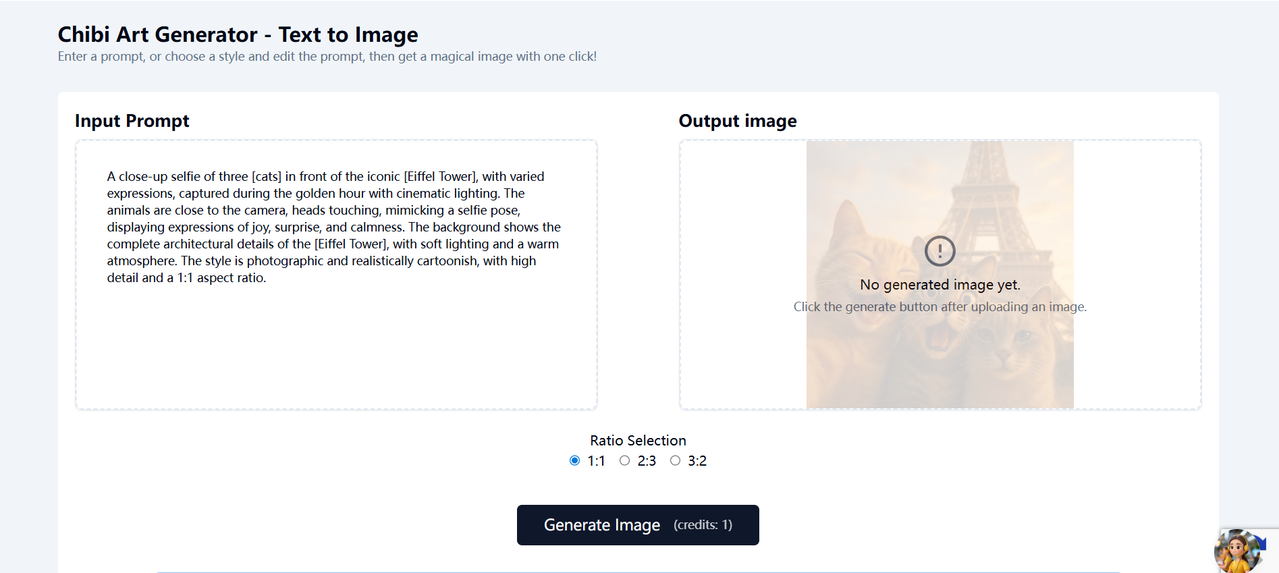
The template generates a detailed base description, such as:
"A close-up selfie of three [cats] in front of the iconic [Eiffel Tower], with varied expressions, captured during the golden hour with cinematic lighting..."
Replace the bracketed placeholders with your specific subjects. This hybrid approach—combining template efficiency with personal customization—ensures you get precisely the chibi clipart style you envision without needing to master complex prompt engineering.
Step 3: Configure Aspect Ratio
Select the optimal dimensions for your project:
- 1:1 (Perfect for social media avatars and profile pictures)
- 2:3 (Ideal for mobile wallpapers or vertical prints)
- 3:2 (Great for desktop backgrounds or horizontal layouts)
Step 4: Generate Your Image
Click the "Generate Image" button. The AI chibi generator processes your request using advanced algorithms to create high-quality, detailed artwork that maintains the charming proportions characteristic of chibi style—oversized heads, expressive eyes, and compact bodies.
Pro Tips for Effective Chibi Creation
Start with Templates, Then Experiment
Even if you're familiar with AI art tools, begin with the preset templates to understand how professional chibi maker prompts are structured. Once comfortable, modify elements like lighting, background details, or character expressions.
Leverage the Bracket System
The templates use brackets [like this] to indicate customizable variables. This structured approach ensures you don't miss crucial descriptive elements that define chibi ai aesthetics.
Credit Efficiency
Each generation consumes one credit (as indicated by the "credits: 1" notation). To maximize your creative output, use the template system to refine your vision before generating, ensuring you get the perfect result on the first try.
Who Is This Chibi Maker For?
- Content Creators: Generate unique avatars, thumbnails, and social media assets
- E-commerce Sellers: Create custom chibi art for merchandise, stickers, and product mockups
- Casual Users: Design personalized gifts or profile pictures without learning complex design software
- AI Art Beginners: The template system acts as a training ground for understanding effective prompt structure
Why Choose This AI Chibi Generator?
In a market saturated with generic image generators, this tool stands out as a specialized chibi maker free of complex technical barriers. The combination of chibi generator technology with an educational template system ensures that even first-time users can produce professional-quality results.
Whether you're looking to create a quick social media avatar or develop a complete set of characters for a creative project, the Text-to-Image feature provides the perfect balance of automation and creative control.
Ready to create your own adorable chibi characters? Visit Chibi.pics and experience how this innovative chibi clipart prompt generator can transform your creative vision into charming digital art.
Comentarios (1)
Comparte tu opinión sobre este artículo.
Debes iniciar sesión para publicar un comentario.
Iniciar sesión para comentargood! I can generate Kawaii Chibi image with pre-build prompts, very easy to use.